Showing posts with label Away3D. Show all posts

Wednesday, 10 April 2013

Quick and dirty jam build: Unstoppable

I took part in last month's Manchester Game Jam, this time opting to do it from home due to my scarily pregnant wife (baby Isaac is here now, but that's a different blog post entirely!).

Anyway, in about a day or so (including a bit of pre-jam cheating, fight me) I put together a quick little arcade tunnel shooter sort of thing. It looks like this:
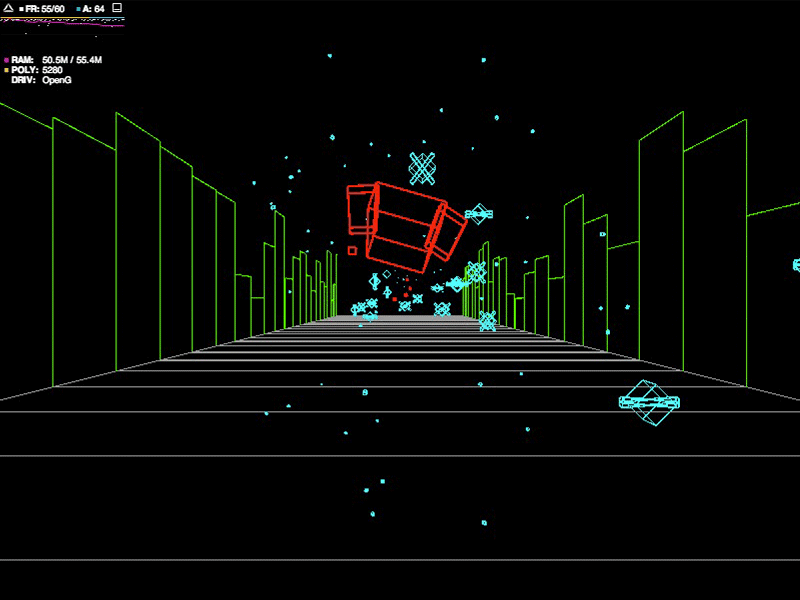


It uses Away3D/stage3d to create wireframe graphics a la Battlezone, ditching textures entirely and creating everything from smoothed wireframe polys at runtime. It ended up being reasonably simplistic, but I was really happy with the feeeeel of it: the physics on the ship turned out really nicely, and after adding some simple directional tilting you really get the sense of a floaty ship. The ship control physics are just 2D easing so it's nice and snappy: it doesn't actually move down the Z axis: the scenery and enemies scroll backwards instead and keep respawning when they drop off behind the camera. Collision detection was awkward until I realised AS3's Point3D contains a distance checker, which saved me a bit of effort.

Below are some images I snapped while I was working through it, as you can see I almost ditched the stark wireframe in favour of coloured flat shading (like the final stage in Rez) but reverted back in the end.

I also put the whole thing on Github if anyone wants to poke around, I built it with IntelliJ Idea and I've included the whole project as it's pretty tiny. The code is absolute filth, but you can see how easy it is to get some sweet retro effects in Away3D.

Oh, and try it out here.

Tons of pics after the cut!


Thursday, 3 February 2011

Accurate Geolocation in Away3D

I built a globe in Away3D recently, and needed to mark on a few countries. It didn't have to be that accurate, but I figured that if I'm going to spend time putting points on it, they might as well be spot-on.

It was actually pretty straightforward to do, and turned out really nicely:


This example works using manually typed latitude and longitude, but it would be pretty simple to hook up an API that would let us edit the points, Google Maps might even do it.

Once we've got our latitude and longitude, the only other thing we need is an accurate map. I made this texture in Photoshop, but ensured that the map I worked off was designed to be wrapped around a globe. When it's laid flat, it actually looks very weird and warped (Antarctica looks massive, for example), but this is to allow for it 'pinching' at the top and bottom when the texture is applied. Obviously the map needs to be set exactly right in terms of placement too, I could tell mine was correct because the UK (i.e. the GMT timezone) was in the exact center:


Each country is then added to an array. I got these manually online, so they're far more accurate than I really need them, but it doesn't really make any difference:

locations.push(["Turkey", 38.963745, 35.243322]);

Once we have the locations, there's some scary-looking math that will convert the latitude and longitude into radians, in three dimensions. Initially I thought that maybe it was just three straightforward trig calculations, but it's actually a little more involved:

var phi:Number = (90 - locations[i][1]) * Math.PI/180;
var theta:Number = (locations[i][2] + 180) * Math.PI/180;
marker.x = (earthRadius + 15) * Math.sin(phi) * Math.cos(theta); 
marker.z = (earthRadius + 15) * Math.sin(phi) * Math.sin(theta);
marker.y = (earthRadius + 15) * Math.cos(phi);
           
(This is a bit of a step up from 2D trigonometry, and I definitely want to get my head around it.)

Anyway, that's the markers placed correctly in 3D space, but we still need them to point 'inwards', towards the center of the globe. We could work this out in the same sort of way as the placement calculation, but Away3D makes it a bit easier by letting us tell each marker to 'look' (orient) itself towards a given point. This is a simple example, so everything orients itself to the center of the space, at 0,0,0:

marker.lookAt(new Number3D(0, 0, 0));
marker.pitch(90);

And that's it, accurate markers on an Away3D globe.

EDIT: Had a couple of people asking for the source, so here's a really basic version to check out. The texture is a free one that I downloaded here.

geolocation.zip [3.2mb]